
The possibility to make YouTube video chapters enables creators to split long video into a structure that will enable viewers to quickly find any video chapter that they would like to watch. This guide explains how to make YouTube video chapters and what benefits creators can get from using them.
What Are Video Chapters?
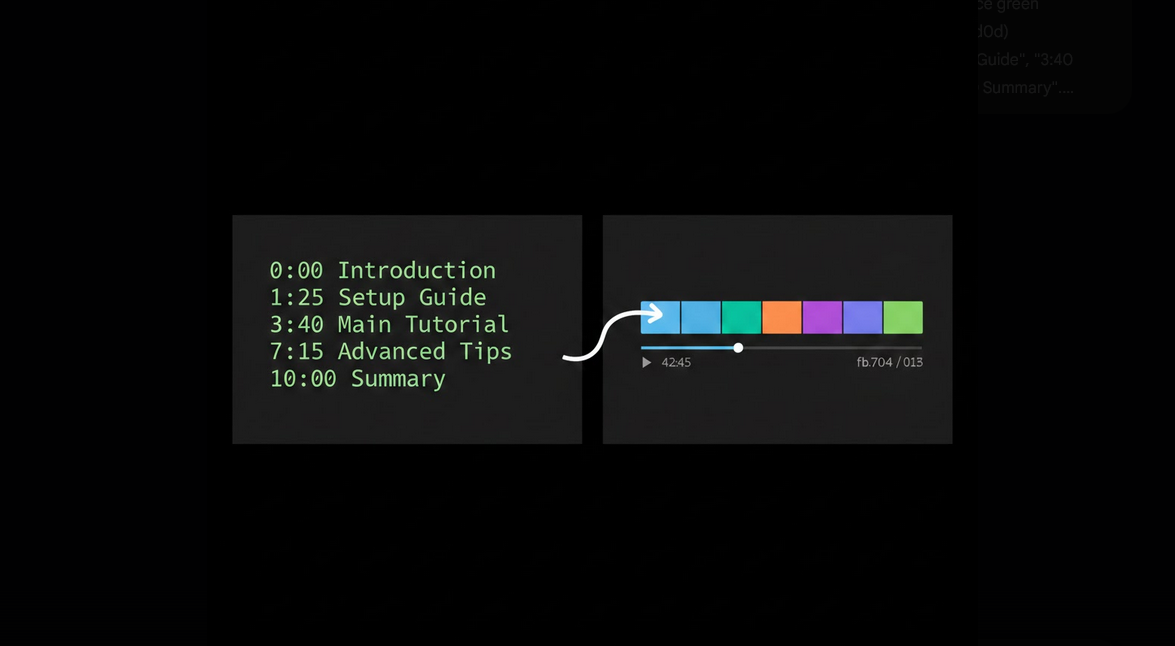
Video chapters are the splits of video that are marked with timestamps and chapter names. The list of video chapters will be displayed in the progress bar, allowing viewers to check all video parts and their duration. Viewers can also open the list of chapters in video description and click on one of them to switch to the required chapter. Hovering over the progress bar will display you the list of video chapters with their titles.
Requirements for Creating Video Chapters
There are certain requirements to creating video chapters.
- Timestamps Should Start with 0:00: The first video chapter should start from the beginning of the video. The lack of 0:00 timestamp means that no chapters will be created.
- Three Chapters at Least: There should be at least three timestamps for making video chapters.
- 10 Seconds Duration: All video chapters should be at least 10 seconds long.
- Timestamps Must Be Written in Description: Timestamps cannot be added in comments or pinned messages.
- Proper Formatting: Each line should contain timestamp with a space and chapter name.
How to Create Video Chapters
- Planning Video Chapters before Recording: It is possible to plan video chapters before or after recording the video.
- Add Timestamps in Video Description: Insert all chapters in your video description, starting from 0:00 with an introduction.
- Describe Video Chapters: Give descriptive names to your chapters, for example, “Installing the Software” instead of “Step 2”.
- Check Your Timestamps: Watch your video and see if the timestamps match the beginning of the chapter.
- Upload Video and Check Chapters: Once the video is uploaded, check if the chapters appear in the progress bar.
Example of the List of Timestamps
Here is how the list of your chapters will appear in the video description. The first line contains timestamp 0:00 and title of introduction, and all other lines have minutes:seconds timestamps with chapter titles. Use descriptive but short chapter names so that viewers can understand what each of them are about.
Automatically Generated Video Chapters by YouTube
YouTube uses AI to automatically generate video chapters if you did not add them to the video description yourself. Automatic chapters are less accurate and do not have descriptive chapter titles. With adding your timestamps, you will overwrite auto-chapters and give the best user experience. If you do not want auto-chapters, adding your chapters will enable you to completely control the process.
Benefits of Using Video Chapters by Content Creators
- Increased Retention: Viewers can watch needed video parts without leaving the video, because they could not find what they needed.
- Increased SEO: Titles of video chapters are displayed in Google search results and increase the probability of seeing your video.
- Professional Look: Chapters show that your video is well-organized and created for the viewer.
- Decreased Bounce Rate: Viewers will switch to the needed chapters instead of leaving the video.
- Showcase Search Snippets: In some cases, Google displays links to video chapters in the search snippets, allowing viewers to enter your video in several places.
Video Chapters on YouTube Vanced
Video chapters on YouTube Vanced have the same appearance but they work much better, because viewers can tap the chapter and switch to another one. The lack of ads in the middle of video viewing allows viewers to switch chapters without being interrupted by ads, which is annoying on the official application. SponsorBlock will help you remove ads by skipping sponsored parts of your chapters.
Creators can preview video chapters on YouTube Vanced with all account settings without MicroG.
How to Create Effective Chapters
- Descriptive Names: Video chapter titles should be descriptive, showing viewers what this chapter is about.
- Short Titles: Try to use 3 to 6 words for chapter titles of your video.
- Include All Important Sections: Include chapters for all important parts of your video.
- Do Not Overload the Viewer: The number of 5 to 10 chapters is the best for most videos.
- Changing Chapters after Publishing: You can change timestamps even if you found any mistakes after publishing your video.
- Using Video Chapters in Tutorial Videos: Tutorial videos will benefit the most from the chapters, because viewers usually return to some steps.
Who Should Include Video Chapters in Videos?
- Tutorial Video Creators: Channels with step-by-step instruction that viewers use to navigate.
- Review Video Channels: Channels that cover several products or different features in one video.
- Podcast Video Channels: Channels with long-form videos covering several topics.
- Educational Video Channels: Lectures that have to give viewers an opportunity to return to certain chapters.
- All YouTubers: All YouTubers will benefit from increased organization, SEO and viewer retention.
Conclusion
Adding video chapters by using timestamps is one of the easiest methods of improving YouTube content. It takes several minutes and greatly improves viewer experience, retention and discoverability. Viewers on YouTube Vanced will easily navigate through video chapters without any ads between them.
